How to Track Client Progress Without Spreadsheets or Stress
A practical system for tracking client progress that doesn't require manual data entry, complex spreadsheets, or expensive CRM software.
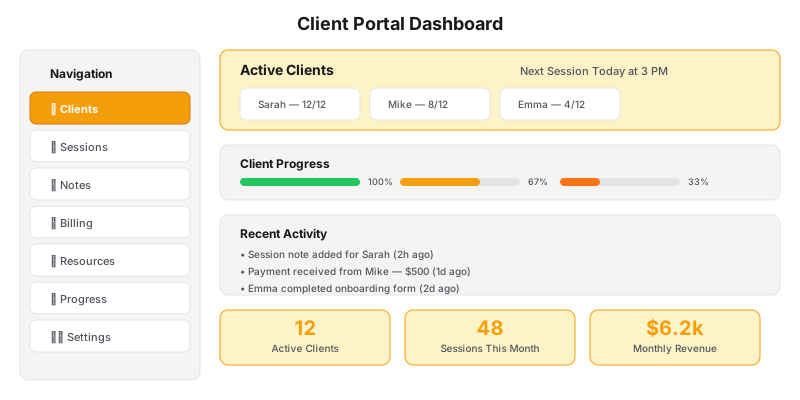
Most coaches track client progress in one of two ways: a chaotic system of sticky notes and email folders, or a sprawling spreadsheet that takes 30 minutes to update after every session.
Neither works. The sticky-note system is unreliable. The spreadsheet system is unsustainable. And neither gives you — or your client — a clear picture of whether the coaching is actually working.
Here’s a progress-tracking system that takes 2 minutes per session, works with any coaching methodology, and gives both you and your client a clear view of their trajectory.
| Data Point | What to Track | How | When |
|---|---|---|---|
| Key Insight | One takeaway from the session | Type in portal after session | Within 1 hour |
| Action Items | 2-3 tasks client committed to | Checklist in portal | During session |
| Progress Score | 1-10 rating on overall goal | Slider in portal | End of session |
| Mood/Rating | Client’s energy level | Emoji or 1-5 scale | Start of session |
| Homework Completion | % of action items done | Manual check | Next session |
The Problem With Traditional Tracking
The reason most progress-tracking systems fail is they try to measure too much.
Coaches want to track: goals, action items, mood scores, homework completion, session insights, life events, and metrics. The result is a form that takes 10 minutes to fill out — which means within two weeks, nobody’s filling it out.
The fix: Track only the minimum viable data. You can always add more later. Start with three things:
- One key insight from each session
- 3 action items committed to
- A 1-10 progress score toward their stated goal
That’s it. Three data points per session. Two minutes to record.
The Two-Minute Session Note
After every session, record exactly this:
Insight: “Client realized that [specific realization]. This shifts their approach to [area].” Action items: “1. [Action], 2. [Action], 3. [Action].” Progress score: “6/10 toward their goal of [goal].”
Keep a running document for each client. Before the next session, review the last entry. You’ll remember where they left off without re-reading three pages of notes.
Tools for Tracking
Option 1: Notion (Free)
Our Notion for Coaches guide covers this in depth. Set up a Sessions database linked to a Clients database. Each session entry has: Insight, Action Items, and Progress Score. Before each session, open the client’s record and scan the last entry.
Option 2: Google Docs (Free)
Create one doc per client. After each session, append a new entry with today’s date and the three data points. Keep it running. Before the next session, scroll to the bottom.
Option 3: Your client portal
If you’re on a Grow or Scale plan, session notes and progress tracking are built into your client portal. You fill in the three data points after each session. The client sees their progress history. You see trends across all clients.
The Progress Review
Every 4-6 sessions, do a formal progress review with each client:
- Pull up the progress scores from the last 4-6 sessions
- Look at the trend: Are scores trending up, flat, or down?
- Review the insights: What patterns emerge across sessions?
- Discuss with the client: “Here’s what I’m noticing. What are you noticing?”
This 10-minute review is often more valuable to the client than the sessions themselves. It gives them concrete evidence of their growth.
Client-Facing Progress Tracking
Some coaches keep progress tracking private. Better: share it with the client.
When clients see their own progress data — “Session 1: 3/10. Session 4: 6/10. Session 8: 8/10.” — it reinforces their commitment and validates the coaching investment.
How to share: After each session, send your client the three-point recap. “Here’s what we covered today. Here’s what you’re working on. Here’s your current progress score toward [goal].”
This takes 2 minutes and dramatically improves client retention and outcomes.
Measuring What Matters
Different coaching niches track different things. Here are examples:
Life coach: Progress score toward stated life goal (1-10). Key insight. Action items.
Business coach: Revenue change. Key decision made. Next strategic move.
Health coach: Habit consistency percentage. Key realization. Next habit to build.
Career coach: Steps completed toward career change. Key insight. Next action.
The specifics change. The three-point structure stays the same.
The Dashboard
If you want a higher-level view, create a dashboard that shows all active clients:
- Client name
- Sessions completed
- Current progress score (most recent)
- Trend direction (up / flat / down — based on last 3 scores)
- Days since last session
- Notes (one-line context — “on track,” “struggling with X,” “considering pause”)
Review this dashboard weekly (15 minutes). Flag any client who is:
- Trending flat or down for 3+ sessions
- More than 14 days since last session
- Showing a “struggling” note
These clients need a different approach — a different modality, a referral, or a check-in conversation.
When to Upgrade
The manual Notion or Google Docs system works for 10-15 active clients. Beyond that, you’ll want an automated system.
A Scale plan includes:
- Automated session notes (Otter.ai integration)
- Progress tracking with trend visualization
- Client-facing progress dashboards
- Automated check-in reminders
- Weekly progress reports sent to clients
No manual data entry. No spreadsheets. No sticky notes.
Want a progress tracking system that doesn’t require manual updates? Let’s talk.