The Tech Launch Checklist for Coaching Programs
Everything you need to set up before launching a coaching program — from landing pages to payment systems to email sequences. A 30-item launch readiness checklist.

Launching a coaching program is stressful enough without discovering on launch day that your payment link doesn’t work, your landing page form isn’t collecting emails, or your calendar isn’t syncing.
This checklist covers every technical item you need to set up, test, and confirm before you open cart. Go through it in order. Mark each item complete. Don’t launch until everything is green.
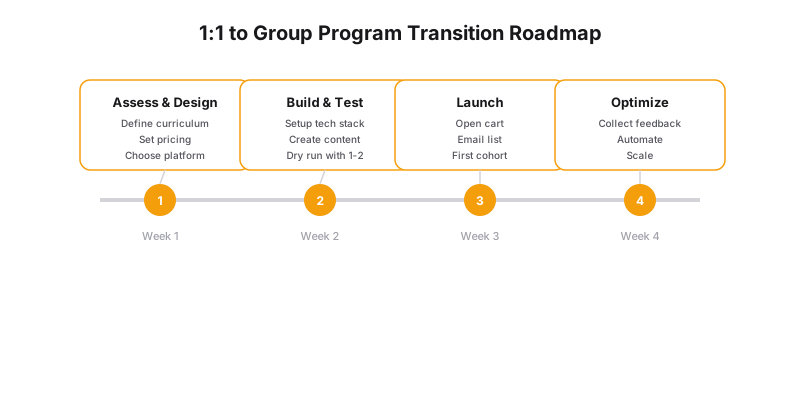
| Phase | Tasks | Timeline | Tools |
|---|---|---|---|
| Pre-Launch | Build landing page, create lead magnet, set up email | 2 weeks | Landing page builder, ConvertKit |
| Cart Open | Send launch sequence, host webinar, social promotion | 1 week | Email, Zoom, social scheduler |
| Close | Send last-chance emails, collect payments, onboard | 3 days | Stripe, Calendly, portal |
| Post-Launch | Feedback survey, analyze data, plan next round | Ongoing | Typeform, Google Analytics |
Week Before Launch: Infrastructure
1. Landing page is live
- Headline clearly states the outcome
- 3-5 bullet points of specific benefits
- Pricing is visible (or “Book a Call” CTA for custom-priced programs)
- FAQ section answers common objections
- Mobile version looks good
- Page loads in under 3 seconds
2. Email capture is working
- Signup form collects at minimum name + email
- Confirmation email sends immediately
- Confirmation email renders correctly on mobile
- Landing page redirects to a “thank you” page after signup
- All signups are tagged correctly in your email tool
3. Payment system is tested
- Stripe/Square/PayPal account is active and verified
- Test transaction succeeds (use a test card number)
- Receipt email sends automatically
- Receipt email contains correct pricing and program name
- Refund process is tested (process a test refund)
- Payment link works on mobile and desktop
- Payment confirmation redirects to the right page
4. Scheduling is configured
- Discovery call calendar is connected and showing correct availability
- Buffer times are set between calls
- Reminder emails are enabled (24h and 1h)
- Zoom/meeting link is attached to the calendar event
- Intake questions are added to the booking flow
- Test booking works end-to-end
Launch Day: Pre-Open
5. Email sequences are ready
- Launch email (Day 1) is written and scheduled
- Social proof email (Day 3) is written and scheduled
- Story/scarcity email (Day 5) is written and scheduled
- Last chance email (final day) is written and scheduled
- All emails have been test-sent and render correctly
- All links in emails go to the right pages
- Unsubscribe link works
6. Social media is prepped
- 5-7 launch posts are created and scheduled
- Graphics/copy are approved
- Links in bio/profile are updated to point to the landing page
- Stories/Reels are pre-recorded or outlined
7. Client onboarding is ready
- Welcome email is written and ready to send on payment confirmation
- Intake form is created and linked
- First session scheduling is set up
- Welcome packet or starter guide is prepared
- Client portal is set up (or Notion pages are shared)
Launch Day: Live
8. Final checks
- Landing page is live and publicly accessible
- Payment link works (run a live test with a small $1 transaction, then refund it)
- Booking link works and shows accurate availability
- All email sequences are turned on (not in draft mode)
- Social posts are published or scheduled
9. Monitoring
- You have access to your email tool dashboard (monitor signups)
- You have access to your payment dashboard (monitor sales)
- You have a system for responding to questions (email/DM/social)
- Someone is assigned to monitor comments and DMs
Common Launch Failures
Here are the most common technical failures we see in coaching launches:
Payment link breaks: The link works in testing but fails under real traffic (rate limiting, server timeout). Fix: Use a dedicated checkout page on your website rather than a third-party payment link.
Email doesn’t send: The sequence was saved as a draft, not published. Fix: Double-check every sequence is “Published” or “Live” — not “Draft.”
Calendar time zone mismatch: Your booking tool shows your time zone but the client sees theirs — and the times don’t match. Fix: Set your booking tool to show times in YOUR time zone with a clear “All times shown in [Time Zone]” note.
Confirmation email goes to spam: Your email tool’s domain authentication (SPF, DKIM, DMARC) isn’t set up. Fix: Verify your domain in your email tool at least 48 hours before launch.
Form data doesn’t go anywhere: The landing page form looks like it submits, but the data goes into a black hole. Fix: Submit a test entry on the live page and confirm it appears in your email tool or spreadsheet.
The No-Stress Launch Setup
The coaches who have the least stressful launches are the ones who don’t duct-tape together 8 different tools. Everything — landing page, payments, booking, email, client onboarding — is one system.
A Generativity Media site includes:
The Launch plan gives you a professional coaching website with integrated booking and payment collection — ready for your first program launch.
The Grow plan adds Content Brain for launch content, email nurture sequences, and priority support during your launch window.
The Scale plan adds a full client portal with onboarding automation, course delivery, and everything you need for high-volume program launches.
A launch list is ops. The email sequence is the container — if it isn’t a sequence, don’t call it a launch.
Want a launch partner who handles all the tech so you can focus on selling? Let’s talk.