The Complete Guide to Client Portals for Coaches
What a client portal is, why it eliminates 80% of your admin overhead, and how to set one up at every budget — from a free Notion page to a fully custom system.


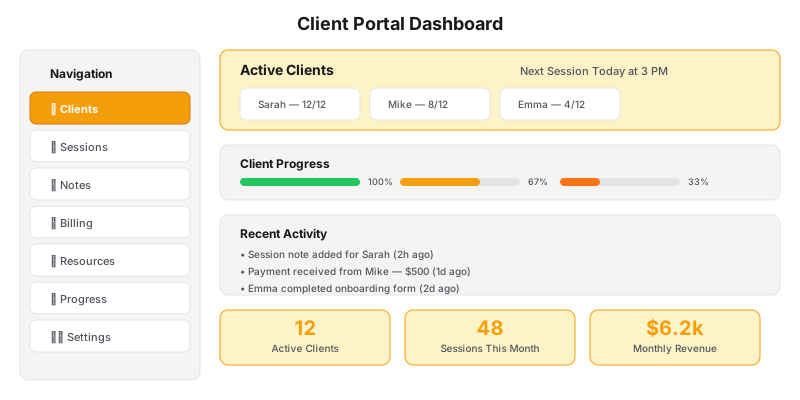
Here’s a test to see if you need a client portal. Count how many of these are true:
- Clients email you asking where to find the intake form (that you already sent them)
- You’ve accidentally emailed a worksheet to the wrong client
- You spend Sunday evenings preparing materials for the upcoming week’s sessions
- Clients text you about scheduling when you have a perfectly good booking link
- You’re paying for 3-4 tools that all partially solve the same problem
If 3 or more are true, you’re losing 5-10 hours a week to client delivery overhead. A client portal fixes that.
What a Client Portal Actually Is
A client portal is a private, password-protected hub where each of your clients can:
- Book and manage sessions
- Access worksheets, recordings, and course materials
- View their progress and session history
- Send you messages (async — not via SMS at 10pm)
- Make payments and review past invoices
- Complete intake forms and assessments
It’s not a “nice to have.” It’s the difference between looking like a freelance coach and looking like a professional coaching business.
| Solution | Price | Best For | Key Features |
|---|---|---|---|
| Notion (DIY) | Free / $10/mo | Solopreneurs starting out | Customizable, templates |
| Honeybook | $39/mo | Client management | Invoicing, contracts, scheduling |
| Dubsado | $40/mo | Full CRM | Workflows, forms, portals |
| SimplyBook.me | Free / $9.99/mo | Booking-heavy | Custom booking site |
| Custom Portal (GM) | Project-based | Scaling coaches | Branded, integrated, automated |
Option 1: The DIY Notion Portal (Free)
Notion is free for individuals and can function as a basic client portal. Here’s exactly how to set it up:
Create a Client Database: One database where each row is a client. Columns for: Name, Package, Start Date, Session Count, Status (Active / Completed / Paused).
Create a Session Database: Linked to the Client database. Each row is a session. Columns for: Date, Focus Area, Notes, Action Items, Next Session Prep.
Create a Content Database: Link this to your Session database. Upload worksheets, recordings, and readings. Use the “Link to database” feature so each client sees only their content.
Share as a page: Use the “Share” button → “Invite” → enter client’s email. They get a private page with their sessions, materials, and notes.
Limitations: Notion isn’t built for payments, scheduling, or automated reminders. It works as a content hub, but you’ll still need separate tools for booking and billing.
Option 2: Purpose-Built Portal Tools ($30-60/month)
These platforms are built specifically for coaching client delivery:
Practice ($50/month Pro plan) — The most popular coaching-specific platform. Includes scheduling, payments, messaging, notes, and content delivery. The client experience is polished. Downsides: limited customization, your clients interact with Practice’s brand, not yours.
Sessions ($39/month Pro plan) — Similar to Practice but with better group program support. Includes a community forum feature. Good for coaches running cohorts.
Mighty Networks ($39/month Pro plan) — If you’re building a community + course hybrid. Not a traditional portal, but works well for group coaching with a content library.
The trade-off: These tools work, but your clients log into their platform, not your website. Every time they interact with your business, they’re reminded they’re using a third-party tool.
Option 3: Custom Portal on Your Website ($300-750/month)
A custom portal built into your website — like what’s included in Generativity Media’s Grow and Scale plans — gives you:
- Your branding: Clients log into your site, not Practice or Sessions
- Your workflow: The portal works exactly how your coaching model works, not how the platform thinks it should
- No middleman fees: You’re not paying Practice $50/month + Stripe fees + Calendly $12/month — it’s all included
- Integrated data: Your portal, website, booking, payments, and content are one system, not five tools connected by Zapier
For solo coaches with 5-15 clients, a purpose-built tool works fine. At 15+ clients, the custom approach saves more time than it costs.
What to Put in Your Portal Week 1
If you’re setting up a portal today (any option), start with these five things:
1. Session scheduler — A way for clients to book their next session without emailing you. Integration with your calendar.
2. Resource library — All your worksheets, guides, and recordings in one searchable place. Organized by module or phase.
3. Session notes — After each session, drop your notes and action items here. Clients can review them anytime.
4. Payment history — Clients can see what they’ve paid and what’s due. Reduces “did my payment go through?” emails.
5. Messaging — In-portal messaging keeps client communication in one place instead of spread across email, SMS, and social DMs.
The ROI of a Portal
Let’s be specific about what a portal saves:
Before portal: Client finishes session → You email them the worksheet → They reply with a question → You reply → They ask about next week’s time → You send your Calendly link → They book → You send a Stripe invoice → They pay → You log it in your spreadsheet
After portal: Client finishes session → Everything they need (worksheet, next booking link, payment portal, session notes) is already in their portal → They handle it themselves → You get a notification
Time saved: 10-15 minutes per client per session × 15 clients × 4 sessions/month = 10 hours per month.
A portal pays for itself in the first week.
Common Objections
“My clients aren’t tech-savvy enough for a portal.” — Clients navigate Uber, Amazon, and online banking every day. A client portal is simpler than all of them. Provide a 2-minute Loom walkthrough and they’ll be fine.
“I like the personal touch of emailing materials.” — The personal touch is in your coaching, not in your PDF delivery. Clients actually prefer having everything in one place. You’re more present in sessions when you’re not exhausted from admin.
“I’ll set it up when I have more clients.” — This is exactly backwards. The portal is what enables you to take on more clients without burning out. Set it up now, while you have the time, so it’s ready when you need it.
A portal is a tray. Progress tracking is what the client actually sees.
Want to see what a custom portal looks like in practice? Let’s talk — we’ll show you one built for a coach with a similar model to yours.